Evidence Summary
- Route
/compras/impreslote- Page title
OG - Lot Printing- Probe file
raw/playwright/compras-impreslote-interaction-probe.json- Screenshot
assets/screenshots/probe-compras-impreslote-interaction-after-filter.png
When to Use This
Use purchase Lot Printing when supplier-side documents need to be found and printed in batch. This page mirrors the Sales lot printing utility but uses supplier context and purchase document tables.
Step-by-Step
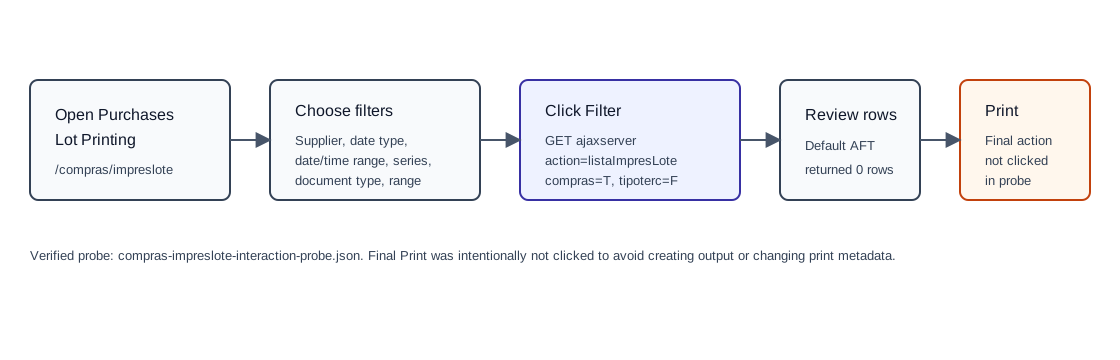
- Open Purchases / Lot Printing, or navigate directly to
/compras/impreslote. - Select a Supplier if the batch should be limited to one vendor.
- Choose whether the date range filters by Date or Data Reg.. The observed default was Date.
- Set Since and to date/time values if needed. The observed default time range was
00:00to23:59. - Choose Serial Num. The observed default used
NSerie=null. - Choose the supplier document type. The observed default was
tipoDoc=AFT, mapped to backend tabledocumaft. - Choose the Print mode. The observed default used
tipo_impressao=-1. - Optionally set Initial and End document-number bounds.
- Keep or clear Group the documents in one file. The observed default was checked with value
T. - Click Filter. The verified probe called
GET /ajaxserver?action=listaImpresLote. - Review the resulting table before printing. The observed table search fields include
search_documentnumber,search_Data,search_Nome, andsearch_Total. - Select rows and click Print only when the supplier-document batch is correct.
Verified Filter Result
| Observed value | Detail |
|---|---|
| Default result | {"data":[]}; the table displayed No data available in table and the button stayed Print(0). |
| Backend call | action=listaImpresLote, date_filter_type=date, date_time_ini=00:00, date_time_fim=23:59, codterc=, tipoterc=F, nserie=null, table=documaft, compras=T, filtrar=T. |
| Main controls | codterc, date_filter_type, dataini, datafim, NSerie, tipoDoc, tipo_impressao, inicial, final, agrupar, and select_all. |
Backend Calls Observed
| Action or endpoint | Purpose |
|---|---|
listaImpresLote | Loads purchase documents eligible for batch printing. Supplier context is expressed with tipoterc=F and compras=T. |
get_home_news and notifications option=get_new_notifications | Background page-load calls captured during the probe. |
Validation Notes
- The default supplier-document type in the probe was
AFT. Other document types should be selected explicitly before filtering. - The final print action can create output or update print metadata, so it was not executed in the verified probe.
- If Print(0) remains visible after filtering, no documents are selected or available for printing.