Evidence Summary
- Workflow run
settings-readonly-probe-20260519T091902Z- Routes
/configuracoes/dadosempresa,/configuracoes/parametros,/configuracoes/impressao,/configuracoes/templates,/configuracoes/webhooks,/configuracoes/extrafields,/configuracoes/valida- Save clicked?
- No. The probe inspected configuration screens only.
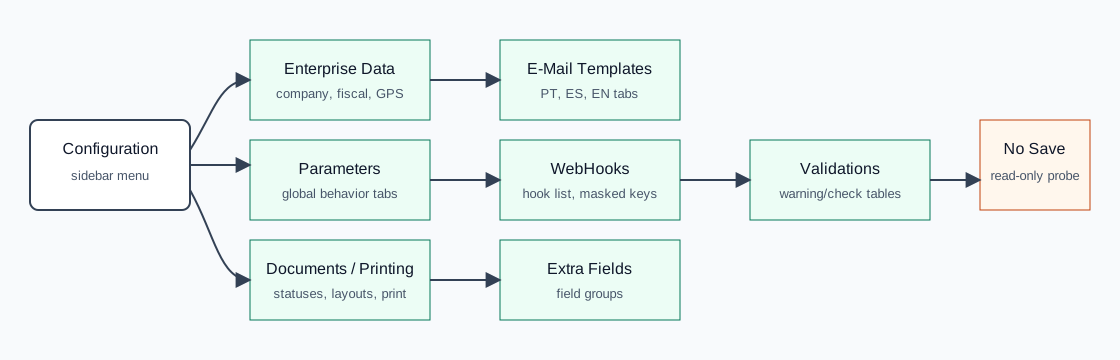
Treat these pages as administrator-only. Do not click Save unless you are intentionally changing configuration and know which downstream modules are affected.
Review Enterprise Data
- Open Configuration then Enterprise Data, or navigate to
/configuracoes/dadosempresa. - Review the General tab for company name, commercial name, address, contacts, website, VAT, fiscal zone, activity data, and GPS coordinates.
- Use the Documents, Attachements, and More tabs to inspect document/company support data.
- Use map/location buttons only when you intend to inspect or adjust coordinates.
- Click Save only after validating company, fiscal, and document implications.
Review Global Parameters
- Open Configuration then Parameters, or navigate to
/configuracoes/parametros. - Use the top tabs to switch between General, Warnings, Authentication, Sales, Purchases, Stocks, CRM, Email, APIs, GDPR, and module-specific settings.
- Search visually by section heading: document defaults, margins, expedition, document columns, stock transfer, notifications, email sending, and integration keys each live in their relevant tab area.
- Before saving, record the previous value and confirm whether the setting affects document creation, stock movement, login/security, email, API integrations, or GDPR processing.
Review Documents and Printing
- Open
/configuracoes/impressao. - Use Documents to inspect document type settings.
- Use Status (Documents) and status transitions to inspect document state rules.
- Use Layouts, Impressions, and Recomendations for print layout and document text settings.
- Use New/Edit/Delete only in a controlled configuration-change task.
Review Email Templates
- Open
/configuracoes/templates. - Switch between Portuguese (Portugal), Spanish, and English tabs.
- Use the template list to find the email context you need.
- Use language-specific edit buttons or Configure Header/Footer only when updating outgoing communication text.
Review WebHooks
- Open
/configuracoes/webhooks. - Search by Hook or URL to locate the integration event.
- Review URL, masked code key, order, and active state.
- Use New/Edit/Delete only after confirming the destination system and the expected event payload.
Review Extra Fields and Validations
- Open
/configuracoes/extrafieldsto inspect extra-field groups by Code, Name, and Type. - Use New/Edit/Delete only when adding or changing metadata fields for a specific entity or document family.
- Open
/configuracoes/validato inspect validation warnings for employees, CRM, business, company, entities, billing parameters, workshops, and warning groups. - Resolve validation warnings by opening the source master data or parameter page shown by the validation table.
API Sequence
| Action | What it does |
|---|---|
Sel2_Select_ZonasFiscais | Loads fiscal-zone values on Enterprise Data. |
Sel2_Contas and bancos&option=sel2_contasbanc | Resolve accounting and bank-account selectors in Parameters. |
dt_list_documents | Loads document type rows in Documents / Printing. |
dt_select_estados and dt_select_transestados | Load document statuses and status transitions. |
impressao&option=dt_impressao_obs | Loads print/document observation or recommendation rows. |
dt_webemailtemplates | Loads email template rows. |
webhooks&option=list_dt | Loads webhook list rows. |
DT_Select with table=ArtExtraGroups | Loads extra-field groups. |
Artifacts
raw/playwright/workflows/settings-readonly-probe-20260519T091902Z.jsonassets/screenshots/settings-readonly-probe-20260519T091902Z-01-enterpriseData.pngassets/screenshots/settings-readonly-probe-20260519T091902Z-02-parameters.pngassets/screenshots/settings-readonly-probe-20260519T091902Z-03-documentsPrinting.pngassets/screenshots/settings-readonly-probe-20260519T091902Z-04-emailTemplates.pngassets/screenshots/settings-readonly-probe-20260519T091902Z-05-webhooks.pngassets/screenshots/settings-readonly-probe-20260519T091902Z-06-extraFields.pngassets/screenshots/settings-readonly-probe-20260519T091902Z-07-validations.png