Evidence Summary
- Workflow run
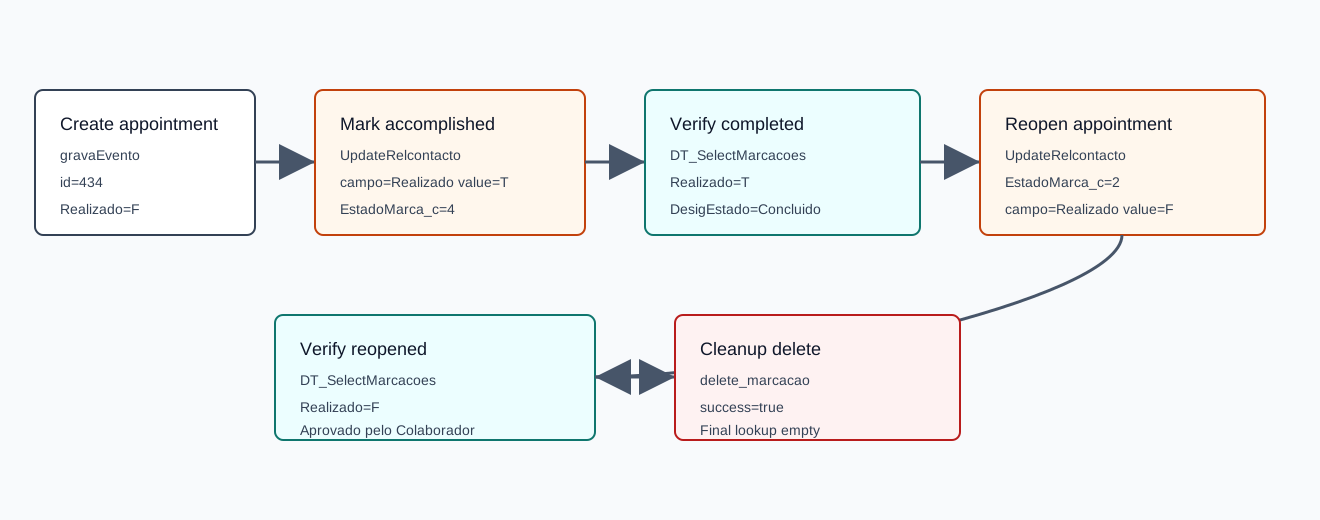
crm-appointment-complete-reopen-20260519T114343Z- Appointment id
434- Detail route
/crm/marcacoes/view/NDM0- Complete action
UpdateRelcontactowithcampo=Realizadoandvalue=T- Reopen action
UpdateRelcontactowithcampo=Realizadoandvalue=F- Cleanup request
delete_marcacao
Before You Start
- Open
/crm/marcacoesand choose the appointment row. - Open the detail route. The verified route was
/crm/marcacoes/view/NDM0. - The accomplished control is the
Realizadocheckbox in the main appointment form. - This checkbox does not wait for the normal Save button. Its change handler asks for confirmation and then updates the appointment by AJAX.
Complete the Appointment
- Open the appointment detail page.
- Check the accomplished /
Realizadocheckbox. - Confirm the prompt asking whether to apply the achievement change.
- OfficeGest sends
UpdateRelcontactoforcampo=Realizadowithvalue=T. - The page also changes the appointment state to completed by sending
UpdateRelcontactoforcampo=EstadoMarca_cwithvalue=4.
The verified list row showed Realizado=T, estado=4, and desigestado=Concluido.
Reopen the Appointment
- Open the same appointment detail page.
- Uncheck the accomplished /
Realizadocheckbox. - Confirm the prompt.
- OfficeGest changes the state back to approved with
campo=EstadoMarca_candvalue=2. - OfficeGest sends
UpdateRelcontactoforcampo=Realizadowithvalue=F.
The verified list row showed Realizado=F, estado=2, and desigestado=Aprovado pelo Colaborador.
Verified AJAX Calls
| Step | Request | Verified result |
|---|---|---|
| Complete flag | GET /ajaxserver?action=UpdateRelcontacto&campo=Realizado&id=434&value=T | HTTP 200; row later showed Realizado=T. |
| Complete state | GET /ajaxserver?action=UpdateRelcontacto&campo=EstadoMarca_c&id=434&value=4 | HTTP 200; row later showed estado=4 and Concluido. |
| Reopen state | GET /ajaxserver?action=UpdateRelcontacto&campo=EstadoMarca_c&id=434&value=2 | HTTP 200; row later showed estado=2. |
| Reopen flag | GET /ajaxserver?action=UpdateRelcontacto&campo=Realizado&id=434&value=F | HTTP 200; row later showed Realizado=F. |
Cleanup Used in Probe
The verification run deleted disposable appointment 434 with POST /ajaxserver, action=delete_marcacao, and response {"success":true}. The final appointment lookup returned no matching row. See How to Manage CRM Appointment Notes for the verified Notes tab workflow.
Artifacts
raw/playwright/workflows/crm-appointment-complete-reopen-20260519T114343Z.jsonassets/screenshots/crm-appointment-complete-reopen-20260519T114343Z-01-before-create.pngassets/screenshots/crm-appointment-complete-reopen-20260519T114343Z-02-before-complete.pngassets/screenshots/crm-appointment-complete-reopen-20260519T114343Z-03-after-complete.pngassets/screenshots/crm-appointment-complete-reopen-20260519T114343Z-04-after-reopen.pngassets/screenshots/crm-appointment-complete-reopen-20260519T114343Z-05-after-delete.png