Evidence Summary
- Route
/stocks/artigos- Page title
OG - Articles- Workflow run
create-article-20260519T021105Z- Created article
AI-DEMO-20260519-021105- Verification
DT_Select_ArtigosIVAreturnedrecordsFiltered: 1- Duplicate validation
article-duplicate-validation-20260519T090211ZreturnedT:AI Demo Article 20260519T021105Z- Evidence file
raw/playwright/workflows/latest-create-article.json
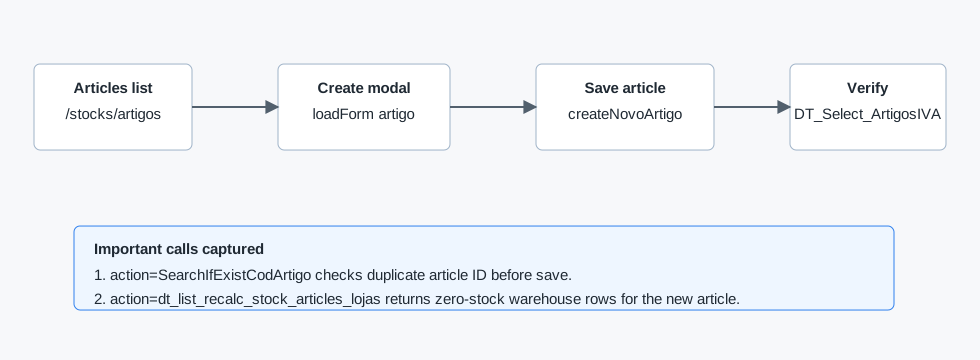
When to Use This
Use this workflow when a user needs a new stock/service article available for sales documents, purchasing documents, stock views, or article lookups. The article starts with zero stock in warehouses unless a separate stock movement is created later.
Step-by-Step
- Open Stocks and then Articles, or navigate directly to
/stocks/artigos. - Click Create New Article. OfficeGest opens the article modal and loads it through
action=loadForm&form=artigo&id=novoartigo. - Fill Article ID. This is the unique code users will search for later. During the verified run, OfficeGest called
SearchIfExistCodArtigofor the entered ID. - If the Article ID already exists, OfficeGest clears the typed value after the duplicate lookup. Choose a different Article ID before continuing.
- Fill Description. This is the human-readable item name shown in lists and document lines.
- Keep or change Article Type. The observed default for a normal stock item is
N, displayed as Standard. - Optionally fill Brand, Family, Sub-Family, Sub-Sub-Family, Bar Code, and Unit.
- Fill required pricing fields: Purchasing Price, Selling Price, and VAT. OfficeGest recalculates related margin and selling-price-with-VAT values in the modal.
- If needed, enable Use Serial N., Uses Lots, complementary article options, or tire-specific fields before saving.
- Click Save. Use Save and New only when creating several articles in sequence.
- Return to the Articles list and use the global search or the Article ID column search to confirm the new article appears.
Fields Observed in the Create Modal
| Group | Fields and behavior |
|---|---|
| Identity | Article ID, Description, Article Type, Brand, Family, Sub-Family, Sub-Sub-Family, Bar Code, Unit. |
| Required | Article ID, Description, Purchasing Price, Selling Price, VAT. |
| Stock tracking | Use Serial N. and Uses Lots checkboxes are available at creation time. |
| Pricing | Purchasing Price, Profit Margin %, Selling Price, Selling Price w/VAT, VAT, and exemption reason. |
| Composition | Complementary article toggle, complementary article selector, extra designation, quantity, complementary price, multiply by quantity, and required flag. |
| Tire article | It is tire?, EPREL Code, Measure, Type Tire, Season, Load Index, Speed index, Energy efficiency, Security, Noise outside, Width, Height, Diameter. |
| Footer actions | Undo, Save and New, Save. |
Backend and API Notes
| Action | Observed purpose | Evidence |
|---|---|---|
loadForm | Fetches the HTML modal for form=artigo and id=novoartigo. | Triggered immediately after clicking Create New Article. |
SearchIfExistCodArtigo | Checks whether the entered Article ID already exists. | During creation, payload included id1=AI-DEMO-20260519-021105. During the duplicate negative test, the existing code returned T:AI Demo Article 20260519T021105Z and the visible input value was cleared. |
createNovoArtigo | Creates the article with identity, unit, pricing, VAT, complementary article, and tire fields. | Payload included CodArtigo, Designacao, PrecoCusto, PrecoVenda, PVP, and CodIva. |
dt_list_recalc_stock_articles_lojas | Loads warehouse stock rows for the created article. | Returned rows for warehouses such as Armazem de Entradas with zero stock. |
DT_Select_ArtigosIVA | Lists and searches articles in the DataTables grid. | Search for the created article returned recordsTotal: 1911 and recordsFiltered: 1. |
The create endpoint response itself was observed as a terse F:/blank response, so the reliable success proof is the follow-up article table lookup and stock-by-warehouse lookup.
Verification Artifacts
assets/screenshots/create-article-20260519T021105Z-01-articles-list.png- starting article list.assets/screenshots/create-article-20260519T021105Z-02-create-modal-empty.png- empty create modal.assets/screenshots/create-article-20260519T021105Z-03-create-modal-filled.png- required fields filled.assets/screenshots/create-article-20260519T021105Z-04-after-save.png- post-save article context.assets/screenshots/create-article-20260519T021105Z-05-search-result.png- verified search result.raw/playwright/workflows/create-article-20260519T021105Z.json- raw request, response, console, and step evidence.raw/playwright/workflows/article-duplicate-validation-20260519T090211Z.json- duplicate Article ID validation evidence.assets/screenshots/article-duplicate-validation-20260519T090211Z-03-duplicate-warning.png- create modal after the duplicate code lookup.
Known Gaps
- Duplicate Article ID validation is verified for an existing normal stock article. The lookup returned
T:AI Demo Article 20260519T021105Zand the modal cleared the duplicate code field. - Stock quantity changes are separate from article creation and remain documented in How to Update Stock.
- Save and New was observed as an available action but has not been executed yet.