Evidence Summary
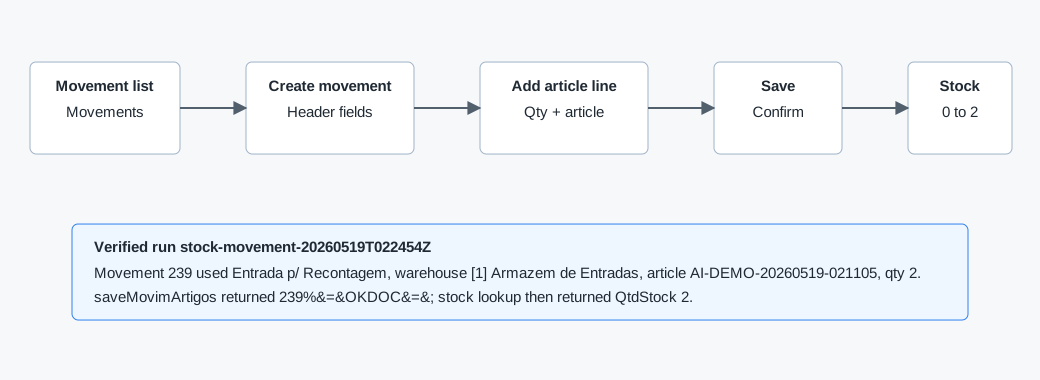
- Workflow run
stock-movement-20260519T022454Z- Movement number
239- Article
AI-DEMO-20260519-021105- Movement type
Entrada p/ Recontagem- Warehouse
[1] Armazem de Entradas- Stock change
0to2
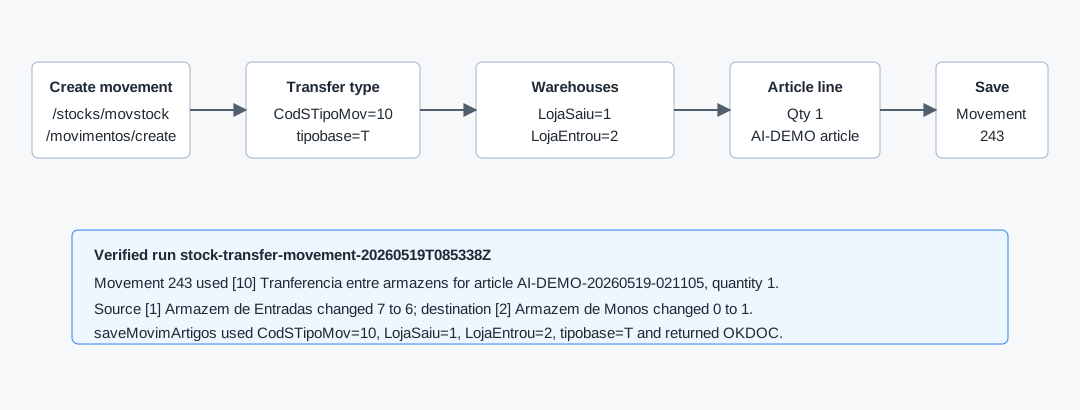
- Transfer run
stock-transfer-movement-20260519T085338Z- Movement number
243- Movement type
[10] Tranferencia entre armazens- Source warehouse
[1] Armazem de Entradas, stock7to6- Destination warehouse
[2] Armazem de Monos, stock0to1
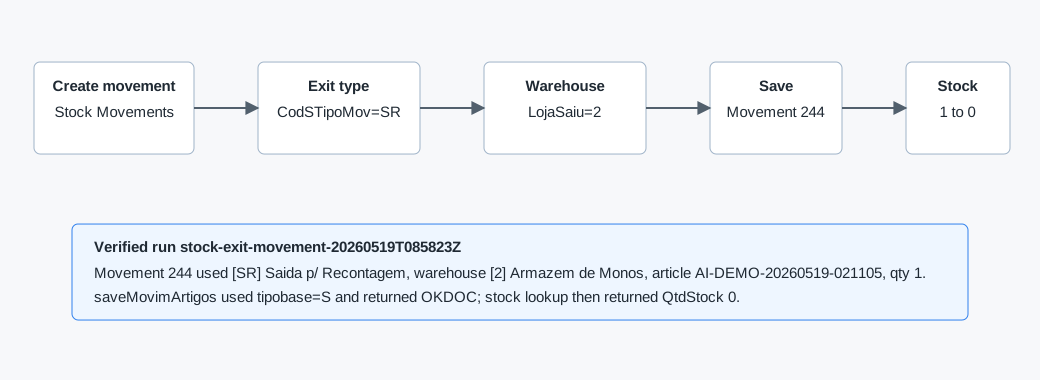
- Exit run
stock-exit-movement-20260519T085823Z- Movement number
244- Movement type
[SR] Saida p/ Recontagem- Warehouse
[2] Armazem de Monos, stock1to0
Known Starting Point
From dashboard quick links, open Artigos at /stocks/artigos to find or create the article. To create a stock movement, open Stocks, Stock Movements, then Movements at /stocks/movstock/movimentos.
Verified Article Management Steps
- Open Stocks then Articles, or navigate to
/stocks/artigos. - Use the type filters to narrow articles by Standard, Services, Accounting, or All.
- Use the status filters to show Active, Inactive, or All.
- Search globally or use column filters for Article ID, Family, Description, Brand, Location Warehouses, Stock, Part Number, VAT, Sub-Family, Net Profit, Unit, Local, Article rating, and Set.
- Use the row view/search icon to inspect an article, or the edit icon to modify it.
- Use Create New Article to open the article creation modal.
Related Verified Workflow
How to Create an Article is verified end to end. The tested article AI-DEMO-20260519-021105 was saved, returned by the article DataTables search, and initialized with zero warehouse stock. Use that workflow before this page when the stock item does not yet exist.
The stock update run then used the same article to create an entry movement and confirm the stock quantity changed in warehouse stock lookup results.
Verified Movement List
Verified read-only. The movements page title is OG - Movements. It lists existing movement documents in the ListaDocumento DataTable.
| Area | Observed behavior |
|---|---|
| Create action | create movement opens /stocks/movstock/movimentos/create. |
| Table columns | Num, Date, Data Reg., Description, Movement Type, Entrance Warehouse, Exit Warehouse, Status. |
| Status filter | All, Open, Canceled, All. |
| Observed rows | Examples include Entrada p/ Recontagem and Saida p/ Recontagem movements against warehouse [1] Armazem de Entradas. |
| List endpoint | DT_Select_MovArtigos returned recordsTotal: 236 during inspection. |
Create Movement Page
Verified open, not saved. The create page was opened and captured without submitting a stock movement. Evidence: raw/playwright/workflows/inspect-stock-movement-create-20260519T021605Z.json.
| Control | Observed detail |
|---|---|
| Collaborator | Defaults to Demo through doc_CodEmpr. |
| Description | Free-text movement description field Descricao. |
| Movement Type | Default observed value [10] Tranferencia entre armazens. Other observed options include Entrada p/ Recontagem, Entrada Stock (Valoriza PCM), Saida p/ Recontagem, Saida Registo Consumos, Saida Sub-Produto, and transfer requisition types. |
| Warehouses | Entrance Warehouse LojaEntrou and Exit Warehouse LojaSaiu. Observed options include Armazem de Entradas, Armazem de Monos, Armazem 01 - Materias Primas, Armazem 02 - Produtos Acabados, _Loja_Freamunde, and Consumo Interno. |
| Date | Defaults to the current date in Data, observed as 19/05/2026. |
| Vehicle | Optional license plate selector doc_CodEquipExt. |
| Article line | Quantity qtd_artigo defaults to 1. Article search field buscaArtigo adds rows to the movement article table. |
| Source document | Optional document Type and Number selectors. Observed type options include AFT, CD, CI, FTM, GIP, GS, GSA, OR, PEC, PRE, RMA, and ENC. |
| Imports | Buttons exist for Upload all stock, Import articles CSV, Example, and Import. The import form posts action=importar_artigos_movart. |
| Save | The primary page action is Save with id actionBarBtnRight0. |
Verified How-To
- Confirm the article exists in Articles.
- Open
/stocks/movstock/movimentos. - Click create movement.
- Enter a clear movement Description.
- Select the correct Movement Type. For a warehouse transfer, use a transfer type and set both Entrance and Exit Warehouse. For recounting/adjustment, use the relevant Entrada or Saida p/ Recontagem type.
- Set Entrance Warehouse and/or Exit Warehouse according to the selected movement type.
- Set the movement date.
- Enter the quantity and search/select the article in Search Articles.
- Review the article line table before saving.
- Click Save.
- Confirm the Bootbox prompt. The verified prompt text was Are you sure? with Cancel and OK.
- After save, OfficeGest opens the movement view page. In the verified run it opened
/stocks/movstock/movimentos/view/MjM5for movement239. - Return to the Movements list and confirm the movement appears at the top with status Open.
Verified Warehouse Transfer Movement
Verified end to end. Run stock-transfer-movement-20260519T085338Z created movement 243 to transfer quantity 1 of article AI-DEMO-20260519-021105 from [1] Armazem de Entradas to [2] Armazem de Monos.
- Open
/stocks/movstock/movimentos/create. - Fill Description.
- Select movement type
[10] Tranferencia entre armazens. - Set Exit Warehouse to
[1] Armazem de Entradas. - Set Entrance Warehouse to
[2] Armazem de Monos. - Set quantity
1, search for the article, and add it to the movement line table. - Click Save and confirm the Bootbox prompt.
- Confirm the movement appears in the movement list with status Open.
The verified save response was 243%#_#The number entered is greater than the stock<br><b>OK</b>&=&OKDOC&=&. Despite the warning text, OfficeGest saved the transfer and redirected to /stocks/movstock/movimentos/view/MjQz. The stock lookup then confirmed warehouse 1 changed from 7 to 6, while warehouse 2 changed from 0 to 1.
Verified Outgoing Recount Movement
Verified end to end. Run stock-exit-movement-20260519T085823Z created movement 244 to reduce quantity 1 of article AI-DEMO-20260519-021105 in [2] Armazem de Monos.
- Open
/stocks/movstock/movimentos/create. - Fill Description.
- Select movement type
[SR] Saida p/ Recontagem. - Set Exit Warehouse to the warehouse whose stock should be reduced.
- In the verified run, Entrance Warehouse was also set to
[2] Armazem de Monosso both warehouse controls matched the target location. - Set the quantity, search for the article, add the article line, and save.
- Confirm the movement appears in the movement list with status Open.
The save request used CodSTipoMov=SR, LojaEntrou=2, LojaSaiu=2, and tipobase=S. OfficeGest returned 244%#_#The number entered is greater than the stock<br><b>OK</b>&=&OKDOC&=& and redirected to /stocks/movstock/movimentos/view/MjQ0. The warehouse stock lookup confirmed warehouse 2 changed from 1 to 0.
Verified API Sequence
| Action | Observed result |
|---|---|
SearchProduct | Autocomplete found AI-DEMO-20260519-021105 with stock 0. |
loadArtigoReducido | Loaded article details including unit UN, VAT 23, cost 1.23, and active status. |
findArtigoCreateMovim | Returned false, indicating the article was not already in the movement lines. |
insertLinhaDocMov | Inserted quantity 2 into movement id 44564; response "1". |
listaTabDocumentoMovim | Returned the line table containing the article, quantity 2, unit UN, lot ., and total cost 2.46. |
saveMovimArtigos | After the Bootbox OK, OfficeGest returned 239%&=&OKDOC&=&. |
dt_list_recalc_stock_articles_lojas | Warehouse [1] Armazem de Entradas stock changed from 0 to 2. |
DT_Select_MovArtigos | Movement list returned recordsTotal: 237 and row 239 with the verified description. |
saveMovimArtigos transfer variant | Warehouse transfer saved with CodSTipoMov=10, LojaSaiu=1, LojaEntrou=2, and tipobase=T; response included OKDOC for movement 243. |
dt_list_recalc_stock_articles_lojas transfer check | After movement 243, source warehouse 1 changed 7 to 6 and destination warehouse 2 changed 0 to 1. |
saveMovimArtigos exit variant | Outgoing recount saved with CodSTipoMov=SR, LojaEntrou=2, LojaSaiu=2, and tipobase=S; response included OKDOC for movement 244. |
dt_list_recalc_stock_articles_lojas exit check | After movement 244, warehouse 2 changed from 1 to 0. |
Remaining Variants
- Serial-number and lot-enabled article movements still need separate runs.
- Negative-stock edge cases for outgoing movements still need a separate blocked/allowed behavior pass.