Evidence Summary
- Workflow run
crm-appointment-create-delete-20260519T112807Z- Appointment id
434- Detail route
/crm/marcacoes/view/NDM0- Create request
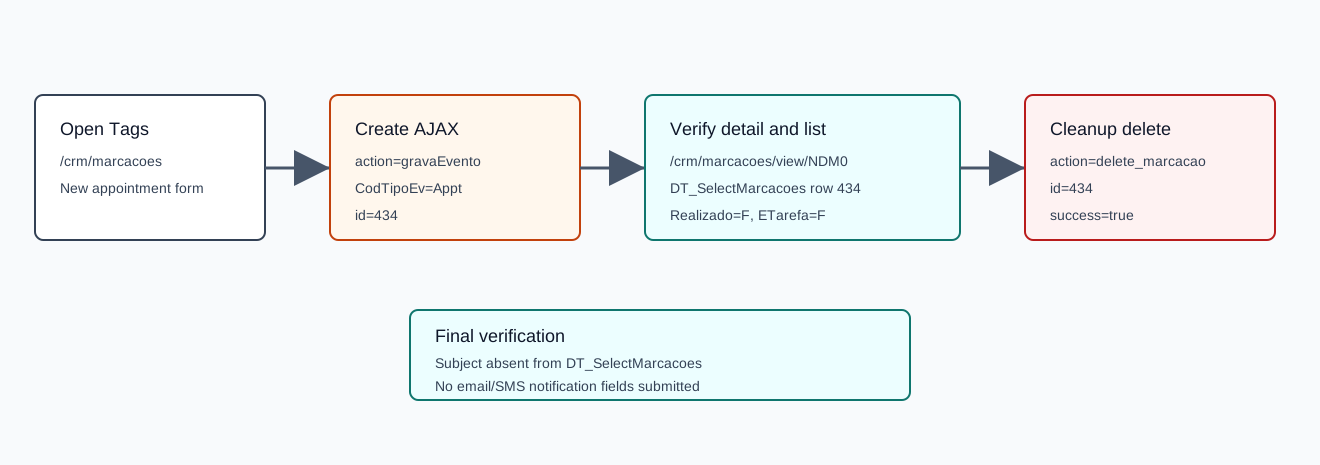
gravaEvento- Delete request
delete_marcacao
Before You Start
- Open CRM then Operations then Tags, or navigate to
/crm/marcacoes. - Click New appointment to open the appointment modal.
- The modal contains tabs for General, Third Part, Marketing, and Others. It also includes hidden/advanced fields for occupation, booking, notification, opportunity, campaign, responsible employee, and commercial metadata.
- Notification checkboxes can submit
notify_send_emailandnotify_send_sms. The verified probe omitted those fields to avoid external email or SMS side effects.
Create the Appointment
- Fill Subject. The verified value was
AI Demo CRM Appointment 20260519T112807Z. - Choose a task/event type. The verified payload used
CodTipoEv=Appt. - Keep Priority at Standard if no escalation is needed. The verified payload used
Prioridade=N. - Set Collaborator, Initial Date, Initial Time, End Date, and End time.
- Optionally add Local and observations.
- Use the Third Part tab only when linking the appointment to a customer, supplier, prospect, commercial, collaborator, or contact.
- Use Marketing only when linking a business opportunity or campaign.
- Use Others to confirm the responsible employee and commercial.
- Click Save.
Verified Create Payload
| Field | Verified value | Meaning |
|---|---|---|
action | gravaEvento | Create/save appointment event. |
Assunto | AI Demo CRM Appointment 20260519T112807Z | Subject. |
CodTipoEv | Appt | Appointment event type. |
Prioridade | N | Standard priority. |
Local | AI verified demo appointment location | Location field. |
CodEmpr | 1 | Collaborator Demo. |
DataContacto | 19/05/2026 | Initial date. |
HoraInicio | 18:10 | Initial time. |
DataFim | 19/05/2026 | End date. |
HoraFim | 18:40 | End time. |
Relatorio | <p>AI verified CRM appointment body</p> | Observations/body. |
ColabResp_c | 1 | Responsible employee. |
CodVend | 1 | Commercial. |
The create response returned id=434, normalized dates, NivelAcesso=C, EventoDiaTodo=F, EstadoMarca_c=2, Realizado=F, ETarefa=F, and registration/change timestamps.
Confirm Creation
- Open the returned detail route. The verified route was
/crm/marcacoes/view/NDM0. - Confirm the detail page heading shows the subject.
- Confirm
DT_SelectMarcacoesreturns the appointment row.
The verified row returned numrel=434, assunto=AI Demo CRM Appointment 20260519T112807Z, codtipoev=Appt, datahinicio=2026-05-19 18:10:00, datahfim=2026-05-19 18:40:00, colab_nome=Demo, resp_nome=Demo, comercial_nome=Comercial 1, desigestado=Aprovado pelo Colaborador, realizado=F, and no associated entity.
Delete the Appointment
- From the Tags/Appointments list, use the row delete action for the intended appointment.
- Confirm the prompt.
- Wait for the table to reload.
The verified delete request was POST /ajaxserver with action=delete_marcacao and id=434. The response was {"success":true}, and the final list lookup returned no row for the appointment subject or id. See How to Edit a CRM Appointment for the verified detail-page edit flow and How to Complete and Reopen a CRM Appointment for the accomplished-state flow.
Artifacts
raw/playwright/workflows/crm-appointment-create-delete-20260519T112807Z.jsonraw/playwright/workflows/crm-marcacoes-page-source-20260519T1125.txtassets/screenshots/crm-appointment-create-delete-20260519T112807Z-01-before-create.pngassets/screenshots/crm-appointment-create-delete-20260519T112807Z-02-detail-created.pngassets/screenshots/crm-appointment-create-delete-20260519T112807Z-03-after-delete.png