Evidence Summary
- Workflow run
tickets-readonly-probe-20260519T090828Z- Ticket list route
/tickets/tickets- Dashboard route
/tickets/dashboard- New ticket route
/tickets/tickets/new- Create workflow
- Create and trash a ticket
- Notes workflow
- Manage ticket notes
- Detail updates workflow
- Update ticket detail fields
- Reply workflow
- Reply with an attachment
- Tasks workflow
- Manage ticket tasks
- Task completion workflow
- Complete a ticket task
- Task conversion workflow
- Convert a ticket task into a ticket
- Spam workflow
- Mark a ticket as spam
- Join workflow
- Join tickets
- Forward workflow
- Forward a ticket
- Resend workflow
- Resend a failed ticket email
- Task types support file
- Manage ticket task types
- Priorities support file
- Manage ticket priorities
- Status support file
- Manage ticket statuses
- Departments support file
- Manage ticket departments
- Topics support file
- Manage ticket topics
- SLA support file
- Manage ticket SLAs
- Filters support file
- Manage ticket filters
- Automatic responses support file
- Manage ticket automatic responses
- Macro replies support file
- Manage ticket macro replies
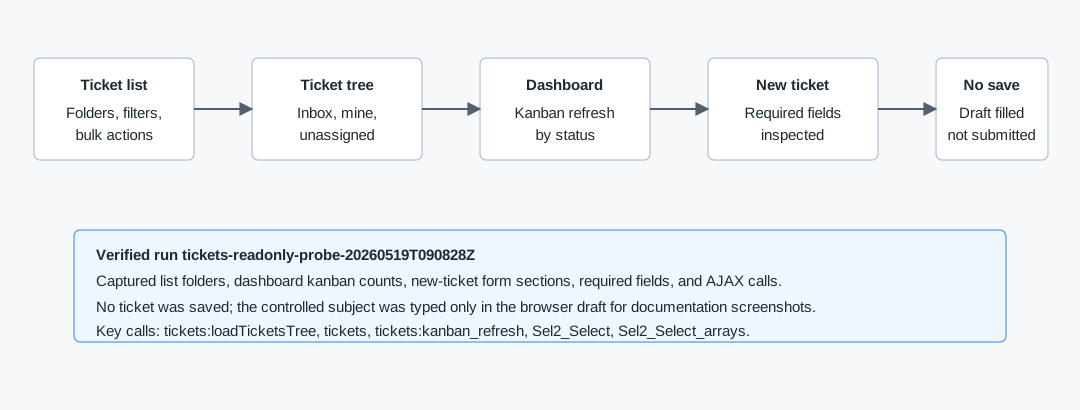
Use the Ticket List
- Open Tickets then Tickets, or navigate to
/tickets/tickets. - Use Inbox, My tickets, Unassigned, and Trash to switch ticket folders.
- Use the global search field to search visible tickets.
- Open Filters for additional search criteria.
- Use Order by and the direction control to change sorting.
- Use View on a row to open a ticket detail page.
- Use bulk actions only after selecting rows: Select all, Join, Spam, or Trash.
Use the Dashboard
- Open Tickets then Dashboard, or navigate to
/tickets/dashboard. - Review the kanban columns: Unassigned, In progress, and Completed.
- Use Filter to narrow by Department, Collaborator, or Entity.
- Use Hide/Show to collapse or show the filter area.
- Open a ticket card when you need the detail page.
Start a New Ticket
- Open
/tickets/tickets/newor click New ticket from the ticket list. - Choose the ticket source type: Phone, Send email, or Other / Unknown.
- Choose the entity type: Employee, Customer, Prospect, Supplier, Business, or Contacts.
- Select the required Entity.
- Optionally fill Contact Person and add attachments.
- Fill required Recipients and Subject.
- Select required Department, Topic, Status, Priority, and Owner.
- Optionally select SLA, Business Opportunity, Campaign, and a Quick Response Template.
- Write the Description / Message.
- Review Signature, Department, and Send email options before saving.
Controlled save behavior is documented in How to Create and Trash a Ticket. The verified create run used send_mail=0 and send_autoresponse=0.
API Sequence
| Action | What it does |
|---|---|
tickets&option=loadTicketsTree | Builds the ticket folder/department tree and counters. |
tickets | Loads ticket list rows with ticket number, subject, entity, assigned user, status, priority, SLA, and message metadata. |
tickets&option=kanban_refresh | Refreshes dashboard columns for unsigned, doing, and done. |
tickets&option=MERGE_tickets | Joins selected ticket rows. Verified with two disposable tickets. |
tickets&option=SPAM_tickets | Marks selected ticket rows as spam. Verified with one disposable ticket. |
tickets&option=forward_ticket, forward_post | Forwards a whole ticket or one post to an email recipient. Invalid test recipient was rejected. |
tickets&option=resend_post | Retries a failed ticket email post. Verified SMTP failure response on a disposable ticket. |
tickets&option=create_task_type, load_task_type, update_task_type, delete_task_type | Creates, loads, updates, and deletes Tickets support-file task types. |
createUpdateTikPriority, loadTikPriority, deleteTikPriority | Creates, loads, updates, and deletes Tickets support-file priorities. |
createUpdateTikStatus, loadTikStatus, deleteTikStatus | Creates, loads, updates, and deletes Tickets support-file statuses. |
createUpdateTikDepartamento, deleteTikDepartment | Creates, updates, and deletes Tickets support-file departments. |
createUpdateTikTopic, loadTikTopic, deleteTikTopic | Creates, loads, updates, and deletes Tickets support-file topics. |
createUpdateTikSLA, loadTikSLA, deleteTikSLA | Creates, loads, updates, and deletes Tickets support-file SLAs. |
createUpdateTikFilter, deleteTikFilter | Creates, updates, and deletes Tickets support-file filters. The verified filter required at least one rule and one action. |
ticketsautoanswer / save_auto_answer, delete_auto_answer | Creates, updates, and deletes Tickets support-file automatic responses. |
createUpdateMacroReply, loadTikMacroReply, deleteTikMacroReply | Creates, loads, updates, and deletes reusable ticket macro replies. |
tickets&option=postNewTicket | Creates a ticket from the new-ticket form. Verified with outbound email and autoresponse disabled. |
tickets&option=replyTicket | Posts a ticket reply and can upload files in anexos[]. Verified with send_email=0. |
tickets&option=create_timeline_resolutions, check_task, task_newticket, delete_resolution_task | Adds, completes, converts, and removes ticket timeline tasks from the ticket detail view. |
tickets&option=noteTicket | Adds a ticket note from the Note tab. |
tickets&option=load_tik_note, update_tik_note, delete_tik_note | Loads, edits, and deletes existing ticket notes. |
tickets&option=UPDATE_ticket | Updates ticket fields. Verified priority, topic, status, owner, and trash cleanup. |
Sel2_Select | Loads status and collaborator defaults. |
Sel2_Select_arrays | Loads priority and collaborator filter options. |
Artifacts
raw/playwright/workflows/tickets-readonly-probe-20260519T090828Z.jsonraw/playwright/workflows/ticket-create-trash-20260519T131756Z.jsonraw/playwright/workflows/ticket-notes-20260519T132254Z.jsonraw/playwright/workflows/ticket-detail-updates-20260519T132757Z.jsonraw/playwright/workflows/ticket-reply-attachment-20260519T133213Z.jsonraw/playwright/workflows/ticket-tasks-20260519T133625Z.jsonraw/playwright/workflows/ticket-status-crud-20260519T142644Z.jsonraw/playwright/workflows/ticket-departments-crud-20260519T143230Z.jsonraw/playwright/workflows/ticket-topics-crud-20260519T143724Z.jsonraw/playwright/workflows/ticket-slas-crud-20260519T144235Z.jsonraw/playwright/workflows/ticket-filters-crud-20260519T153928Z.jsonraw/playwright/workflows/ticket-autoanswer-crud-20260519T155118Z.jsonraw/playwright/workflows/ticket-macro-replies-crud-20260519T152909Z.jsonassets/screenshots/tickets-readonly-probe-20260519T090828Z-01-ticket-list.pngassets/screenshots/tickets-readonly-probe-20260519T090828Z-03-ticket-dashboard.pngassets/screenshots/tickets-readonly-probe-20260519T090828Z-05-new-ticket-form.pngassets/screenshots/tickets-readonly-probe-20260519T090828Z-06-new-ticket-draft-filled-not-saved.png