Evidence Summary
- Workflow run
crm-readonly-probe-20260519T092953Z- Routes inspected
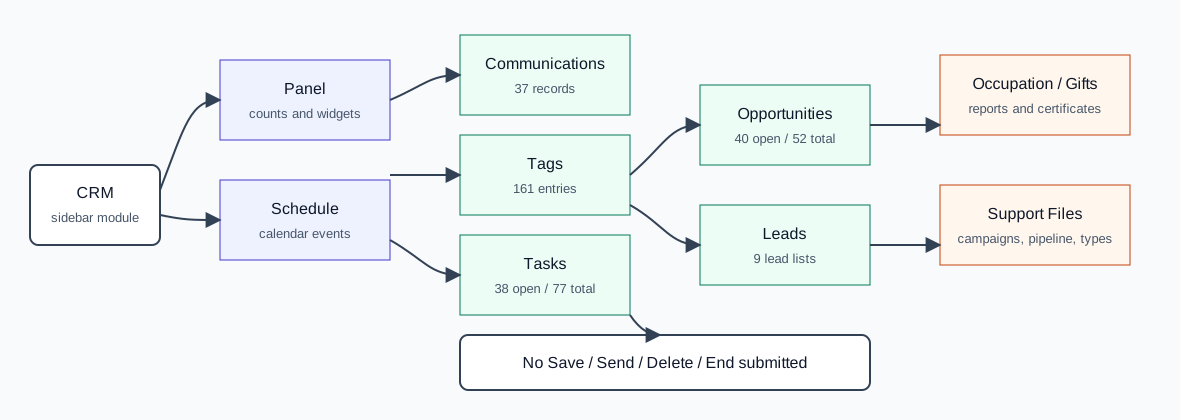
- Panel, Schedule, Comunications, Tags/Appointments, Tasks, Business Opportunities, Leads, Occupation, Gift Certificates, Campaigns, Pipeline, and Task Type
- Submitted changes?
- No.
Use the CRM Panel
- Open CRM then Panel, or navigate to
/crm/painelresumo. - Use the activity-center tabs to switch between All, Geral, Messages, Tasks, Documents, Tickets, Comunications, Tags, Business Opportunities, Automatic, and More.
- Use See all Messages, See all Tasks, and See all documents to jump from dashboard widgets to full lists.
- Use New Communication or Send SMS only when you intend to create or send a communication.
Use the Schedule
- Open CRM then Schedule, or navigate to
/crm/agenda. - Use My and All to switch between personal and shared calendars.
- Use Filters to narrow calendar events.
- Use Month, Week, Day, Today, and previous/next navigation to change the calendar view.
- Open appointment or business-opportunity forms only when you intend to create or edit a scheduled CRM record.
Use CRM Operations
- Open
/crm/communicationsto review communications. The verified list contained 37 records during the read-only probe and exposes New Communication plus duplicate-related controls. See How to Create a CRM Communication, How to Edit a CRM Communication, How to Add Contacts to a CRM Communication, How to Edit a Contact in a CRM Communication, How to Delete a Contact from a CRM Communication, How to Delete All Contacts from a CRM Communication, How to Remove Duplicate Contacts from a CRM Communication, How to Delete a CRM Communication, and How to Duplicate a CRM Communication for the verified communication workflows. - Open
/crm/marcacoesto review tags/appointments. Use Appointment, Occupancy, Third Part, Marketing, Attachments, Notes, Interventions, and Others tabs, plus filter controls. See How to Create and Delete a CRM Appointment, How to Edit a CRM Appointment, How to Complete and Reopen a CRM Appointment, How to Manage CRM Appointment Notes, How to Link a CRM Appointment to an Entity, How to Link a Contact to a CRM Appointment Entity, How to Manage CRM Appointment Interventions, How to Manage CRM Appointment Attachments, and How to Repeat a CRM Appointment for the verified appointment workflows. - Open
/crm/tarefasto review tasks. Use My/All, the table search, New task, and With selected bulk actions. See How to Create a CRM Task, How to Complete a CRM Task, How to Bulk Mark CRM Tasks Accomplished, How to Reopen or Edit a CRM Task, How to Edit CRM Task Notes, How to Link a CRM Task to an Entity, How to Link a CRM Task to a Contact, How to Delete a CRM Task, and How to Bulk Delete CRM Tasks for the verified task flows. - Do not use Send, Duplicate, With selected, complete/end, or delete-style controls unless you have selected the intended records and confirmed the side effect.
Use Opportunities and Leads
- Open
/crm/oportunidadesnegociosfor business opportunities. See How to Create and Delete a CRM Business Opportunity, How to Edit a CRM Business Opportunity, How to Manage CRM Business Opportunity Observations, and How to Change a CRM Business Opportunity Phase for the verified opportunity workflows. - Filter opportunities by Area, Commercial, Step, Source, Customer, Prospect, Opened, Won, Lost, or All.
- Use columns configuration when you need to change which opportunity fields are shown in the grid.
- Open
/crm/leadsfor lead lists. See How to Create and Delete a CRM Lead List for the verified CSV import and cleanup workflow; use edit, attach, and snapshot actions only when maintaining lead records.
Use Occupation, Gift Certificates, and Support Files
- Open
/crm/ocupacaoto review employee occupation by opportunity/team/year/month. - Open
/crm/valesofertato review gift certificates or open the Create gift cards form. See How to Create and Delete a CRM Gift Certificate for the verified creation and cleanup workflow. - Open
/crm/apoio/campanhasto maintain CRM campaigns. See How to Create, Edit, and Delete a CRM Campaign for the verified campaign support-file workflow. - Open
/crm/apoio/pipelineto maintain sales pipeline steps. See How to Create, Edit, and Delete a CRM Pipeline Step for the verified pipeline support-file workflow. - Open
/crm/apoio/tipotarefato maintain task types, icons, colors, and active state. See How to Create, Edit, and Delete a CRM Task Type for the verified task-type support-file workflow.
API Sequence
| Action | What it does |
|---|---|
getMineRelContQtd | Loads current user's tag/contact count for the CRM panel. |
getMineOportNegQtd | Loads current user's opportunity count for the CRM panel. |
getAgendaEventos | Loads schedule/calendar events for the visible date range. |
DT_Select_Communications | Loads the communications DataTable. |
communications / postNewComm | Creates a CRM communication draft. The verified email draft created communication 39. |
communications / postEditComm | Saves CRM communication draft edits. The verified edit changed communication 39 email subject and body while keeping status RDY. |
communications / getPesquisaEntidadesComm | Searches eligible entities/contacts for communication recipient selection. The verified add-contact run searched customer email rows. |
communications / postAddLCommunicationsValidate | Validates selected communication recipients before adding them. |
communications / postAddLCommunications | Adds selected recipients to a communication contact list. The verified run added contact 1240 to communication 39. |
load / lcommunication | Loads a communication recipient line for editing. The verified run loaded row 1173. |
communications / UPDATE_lcommunication | Updates a communication recipient line address and per-recipient content. The verified run changed row 1173 to ticketsdemo@guisoft.com. |
delete / lcommunication | Deletes a recipient line from a communication contact list. The verified run deleted line 1172. |
communications / deletelines | Deletes every recipient line from a communication contact list. The verified run cleared row 1174 and returned contact counters to zero. |
communications / filterduplicates | Removes duplicate recipient rows from a communication contact list. The verified run reduced duplicate rows 1176 and 1175 to one remaining row. |
communications / DELETE_communication | Deletes a CRM communication. The verified delete removed communication 39. |
communications / DUPLICATE_communication | Duplicates a CRM communication. The verified duplicate copied source 39 into communication 40 with enviado=T. |
DT_Select_LCommunications | Loads the communication detail contact/list tab after opening a communication. |
DT_SelectMarcacoes | Loads appointment/tag rows. |
gravaEvento | Creates or saves a CRM appointment/tag event. The verified create run created appointment 434. |
POST /crm/marcacoes/view/{id} with update=datalocal | Updates the main CRM appointment detail form. The verified edit changed appointment 434 subject, local, observations, and time window. |
UpdateRelcontacto with campo=Realizado or campo=EstadoMarca_c | Completes or reopens an appointment from the detail page accomplished checkbox. The verified run set appointment 434 to Realizado=T / EstadoMarca_c=4, then back to Realizado=F / EstadoMarca_c=2. |
agregarNotaMarcacao, UpdateNotaMarcacao, and delete_nota_cliente | Adds, edits, and deletes appointment notes. The verified run created note 2, edited its subject/body, and removed it with type=MAR. |
create_relcont_entity, delete_relcont_entity, and DT_load_relcont_entities | Links, verifies, and unlinks entities on appointment detail pages. The verified run linked customer 910 to appointment 434 as relation 256, then removed it. |
create_relcont_entity_contact and delete_relcont_entity_cont | Links and unlinks contacts under an appointment entity relation. The verified run linked contact 23 under relation 258, then removed it. |
oficinas / list_relcontacto_tiposintervencao, add_relcontacto_tiposintervencao, update_relcont_intervencao, and del_relcontacto_tiposintervencao | Lists, adds, edits, and deletes appointment intervention rows. The verified run added intervention 28, edited extra designation and minutes to 45, and removed it. |
delete_marcacao | Deletes a CRM appointment/tag event. The verified cleanup deleted appointment 434. |
dt_tarefas | Loads task rows, including open/finished filtering. |
POST /crm/tarefas/view/{id} | Updates a task detail page. The verified completion used /crm/tarefas/view/NDMx for task 431. |
updateRelcontactoMultiple | Bulk-updates selected CRM task fields. The verified Accomplished action used ids=433, campo=Realizado, and valor=T. |
deleteTarefasMultiple | Deletes one or more CRM tasks after confirmation. The verified detail delete used tarefas[0]=432 via POST; the verified bulk delete used tarefas[0]=434 via GET. |
getEntidade | Loads entity summary fields after choosing a task entity type and record. The verified task entity link used tipo=C and id=910. |
getContacto | Loads contact summary fields after choosing a task contact. The verified task contact link used id=27. |
DT_ListaOportNeg | Loads business opportunity rows. |
graphquerys&option=getOportunidadesNegocioSegmentadas | Loads segmented opportunity chart data. |
DT_SelectLeads | Loads lead-list rows. |
DT_Select | Loads support-file rows such as gift certificates, campaigns, and pipeline steps. |
crm_tipotarefas&option=dt | Loads CRM task types. |
Artifacts
raw/playwright/workflows/crm-readonly-probe-20260519T092953Z.jsonassets/screenshots/crm-readonly-probe-20260519T092953Z-01-crm-painelresumo.pngassets/screenshots/crm-readonly-probe-20260519T092953Z-02-crm-agenda.pngassets/screenshots/crm-readonly-probe-20260519T092953Z-05-crm-tarefas.pngassets/screenshots/crm-readonly-probe-20260519T092953Z-06-crm-oportunidadesnegocios.pngassets/screenshots/crm-readonly-probe-20260519T092953Z-12-crm-apoio-tipotarefa-new-surface-not-saved.png