Fast Start
Use this table first when the user asks a practical invoicing question. It routes the request to the verified OfficeGest document family before opening the longer evidence sections.
| What the user says | Start with | Why | Next guide |
|---|---|---|---|
| "I need to invoice a customer and they will pay later." | Invoice [FT] | Creates an open receivable invoice with pending value. | Core invoice choices |
| "The customer is paying now." | Invoice / Receipt [FR] or Simplified Invoice [FS] | Both require payment before final save; FR is the fuller invoice/receipt path, FS is the fast simplified invoice path. | Payment validation guides |
| "They are paying an invoice we already issued." | Receipt [R] | Settles one or more open FT documents and changes the source invoice payment state. | Payment and correction documents |
| "I need to correct or reverse an issued invoice." | Credit Note [NC] or Debit Note [ND] | NC reduces/reverses value; ND adds value owed. Use cancellation only when the issued document itself must be annulled. | Correction documents |
| "The customer only needs a quote or order." | Quotation [ORC], Pro-Forma [FP], or Sales Order [ENC] | These preserve the commercial process before final fiscal invoicing. | Pre-sale documents |
| "I need to send or move goods." | GR, GT, GIP, GA, NGT, GC, GSA, or GS | Guide documents cover fulfillment, transport, warehouse movement, supplier movement, consignment, and separation. | Goods movement and fulfillment |
Decision Flow
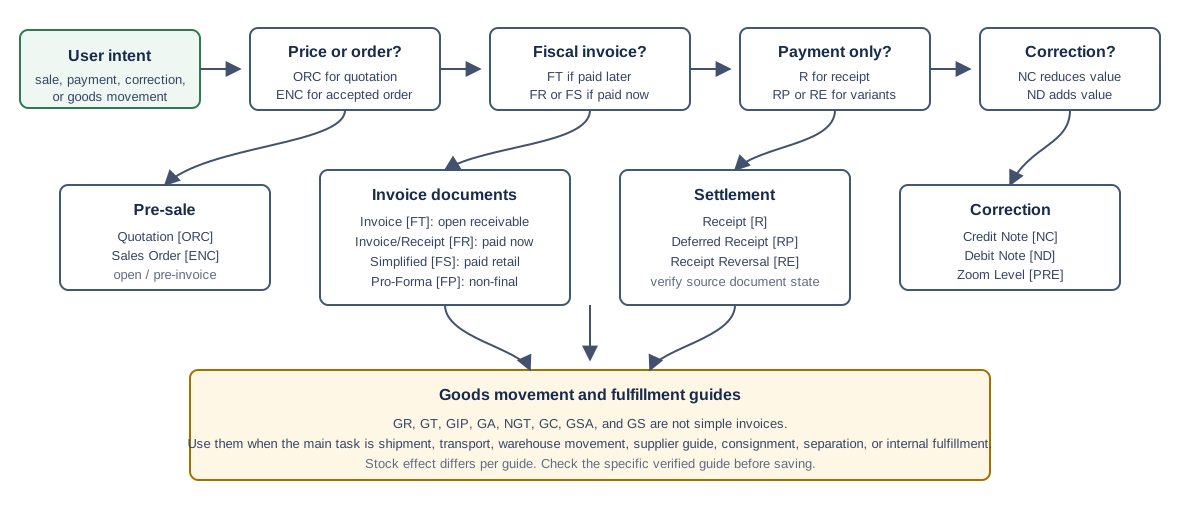
- If the customer is only asking for a price, create a Quotation [ORC].
- If the customer accepted and you need an order before invoicing or fulfillment, create a Sales Order [ENC].
- If the document must be fiscal now, decide whether it should be paid immediately: use FR or FS for immediate payment, and FT for a receivable invoice to pay later.
- If the customer is paying an existing open invoice, create a Receipt [R]. If the receipt itself needs a reversal against an open credit value, use Receipt Reversal [RE].
- If the original invoice needs correction, use Credit Note [NC] to reduce or reverse value, or Debit Note [ND] to add value owed.
- If the job is movement or fulfillment rather than invoicing, use the guide family: GR, GT, GIP, GA, NGT, GC, GSA, or GS.
Core Invoice Choices
| User need | Document | Route | Verified behavior | Guide |
|---|---|---|---|---|
| Issue a normal receivable invoice to be paid later. | Invoice [FT] | /vendas/ft/create |
Saves open with ValorPago=0; pending value equals total; stock updates. Verified run sales-invoice-ft-20260519T040734Z created FT 9999/1666. FT public/internal notes, Portes/shipping line insertion, VAT/totals readout, article search and line insertion, customer selection, gift-card apply boundary, loyalty-card lookup and discount boundary, vehicle details, PDF generation from the saved view, public-link copy from the saved view, public-link PDF download, email composer preparation from the saved view, SMS composer preparation from the saved view, WhatsApp availability check from the saved view, attachment upload/download/delete/edit from the saved view, duplicate form preparation from the saved view, line expected dates, line descriptions, line units, line unit prices, line gross prices, line discounts, line VAT rates, line VAT reasons, line warehouses, line cost centers, line accounting classifications, global discounts, payment terms and due date, alternate billing address, delivery details, classification, currency/exchange rate, fiscal-zone check, draft save, header edit, line add, quantity change, line deletion, finalization, cancellation, FT view to NC credit-note creation, and FT view to R receipt settlement are verified. |
Create a sales invoice Print or download PDF Copy public link Download from public link Prepare invoice email Prepare invoice SMS Check WhatsApp availability Manage attachments Download attachment Edit attachment metadata Prepare duplicate invoice Add invoice notes Add Portes / shipping Read VAT and totals Search and add article line Select customer Apply gift card Use loyalty card Add vehicle details Hide vehicle details from printout Set line expected date Change line description Set line unit Change line unit price Change line gross price Apply line discount Set line VAT Set line VAT reason Set line warehouse Set line cost center Set line accounting classification Apply global discount Set payment terms Set billing address Set delivery details Set classification Set currency Check fiscal zone Save invoice draft Edit saved draft Add line to saved draft Change quantity on saved draft Delete line from saved draft Finalize saved draft Fix No lines error Fix mandatory fields error Cancel a sales invoice Convert to credit note Create receipt from invoice view |
| Invoice the customer and record payment immediately. | Invoice / Receipt [FR] | /vendas/fr/create |
Requires payment before final save; finishes paid; stock updates. Verified run invoice-fr-20260519T024739Z created FR 9999/841. Missing-payment, partial-payment warning, partial-payment correction, overpayment/change, payment-row deletion, inactive-customer, split-payment, and cancellation paths are verified. |
Create an invoice / receipt Create with split payment Handle overpayment Correct partial payment Delete wrong payment row Cancel an invoice / receipt Fix inactive customer Fix missing payment Fix partial payment warning |
| Create a fast paid retail or point-of-sale style invoice. | Simplified Invoice [FS] | /vendas/fs/create |
Requires payment before final save; finishes paid; stock updates. Verified run simplified-invoice-fs-20260519T043414Z created FS 9999/8. Missing-payment validation, split-payment finalization, partial-payment correction, overpayment/change, payment-row deletion, and cancellation are verified. |
Create a simplified invoice Create with split payment Handle overpayment Correct partial payment Delete wrong payment row Cancel a simplified invoice Fix missing payment |
| Send a non-final fiscal-style document before issuing the final invoice. | Pro-Forma Invoice [FP] | /vendas/fp/create |
Saves open; did not affect physical stock in the verified runs. Verified creation run proforma-invoice-fp-20260520T002252Z created FP 9999/66. Saved FP documents can be converted to FT, FR, or ENC; all three FP finalization paths are verified. Verified cancellation run cancel-proforma-invoice-fp-20260520T002319Z cancelled FP 9999/66. |
Create a pro-forma invoice Cancel a pro-forma invoice Convert and finalize as invoice Convert and finalize as invoice / receipt Convert and finalize as sales order |
Saved FT Action Hub
Use this table after an Invoice [FT] is already saved and you are deciding what to do from the invoice view. These actions start from /vendas/ft/view/{encoded-number}; only the cancellation, credit-note, and receipt paths intentionally change invoice or accounting state.
| User need | Menu or surface | Verified behavior | Guide |
|---|---|---|---|
| Generate a PDF from the authenticated back office. | Print / PDF | imprimir returned the PDF filename and the browser downloaded a valid %PDF-1.7 file. |
Print or download PDF |
| Give the customer a public document page. | Communicate / Copy document`s public link | The clipboard received a pdoc.officegest.com URL that showed the invoice, customer, amount, and download action outside the authenticated session. |
Copy public link |
| Download the PDF from the public customer page. | Public document page Download | The public page downloaded FT 9999_1699.pdf; unauthenticated action-log failure did not block the download. |
Download from public link |
| Review the email before sending it. | Communicate / Send email | Loaded recipients, language, template, body, total, and due date; no email was sent in the verified run. | Prepare invoice email |
| Review SMS content before sending it. | Communicate / SMS | Loaded language, template id, SMS body, and recipient state; no SMS was sent in the verified run. | Prepare invoice SMS |
| Check whether WhatsApp sending is available. | Communicate / Whatsapp | The demo account returned false for chatflow&option=has-whatsapp-service; no composer or send request opened. |
Check WhatsApp availability |
| Store supporting files against the invoice. | Attachements tab / Upload file | AceUpload bound the file to numdoc=999901699 and tipodoc=FT; row delete returned the table to empty. |
Manage attachments |
| Correct attachment metadata after upload. | Attachements tab / row Edit | The edit modal loaded description, category, and public flag; editAttachment returned success:true and the row reloaded with the edited description and public=0. |
Edit attachment metadata |
| Retrieve an uploaded supporting file. | Attachements tab / row Download | The row download action triggered a browser download using the original file name and preserved the uploaded text content exactly. | Download attachment |
| Start a new invoice using the same source invoice data. | Duplicate | Opened /vendas/ft/dupl/{encoded-source-number}, copied customer, line, and totals, and stopped before save. |
Prepare duplicate invoice |
| Correct or reverse issued invoice value. | To convert / Credit note | Created a linked NC credit note from the FT view and left the original invoice as the source document. | Convert to credit note |
| Receive payment for the invoice from the invoice view. | To convert / Receipt | Opened an R receipt with the FT preloaded, saved the settlement, and verified the source invoice became paid. | Create receipt from invoice view |
| Annul an issued invoice. | Cancel | Required a cancellation reason and irreversible confirmation; final state became ANU / Canceled and stock was reversed. |
Cancel a sales invoice |
| Annul an issued invoice / receipt. | Cancel | Required a cancellation reason and irreversible confirmation; final state became ANU / Canceled, paid value remained visible, and stock was reversed. |
Cancel an invoice / receipt |
Validation and Recovery Guides
| User sees | Most likely cause | Verified behavior | Guide |
|---|---|---|---|
| No lines | The FT has no document lines. | OfficeGest shows ErrorNo lines, stays on /vendas/ft/create, and does not submit saveDocument. |
Fix FT No lines error |
| There are mandatory fields unfilled | The document has lines but the billing customer/VAT fields are empty or invalid. | OfficeGest marks #doc_CodTerc and #doc_NContrib with chosen-error and does not submit saveDocument. |
Fix mandatory fields error |
| Inactive billing entity | The selected customer is inactive. Demo customer 1 returned activo:"F". |
OfficeGest shows the inactive billing warning, clears the billing customer/VAT fields, and blocks final save. | Use final customer during invoicing Fix inactive FR customer |
| Payment modal opens and save does not finish FR. | The FR has no payment line or payment total is below the document total. | payment&option=validate returns valid:"NONE", payment total stays 0.00, and no saveDocument is submitted. |
Fix FR missing payment |
| Payment warning after a payment row exists on FR. | The FR payment row is below the document total. | payment&option=validate returns valid:false with troco:-0.97 in the verified short-payment run. |
Fix FR partial payment |
| User wants to keep the same payment method but fix the amount. | The existing FR payment row value can be edited before saving again. | NUM 1.00 was edited to NUM 1.97; validation returned valid:true; final save created FR 9999/847 with paid value equal to the total. |
Correct FR partial payment |
| Customer pays one FR with two payment methods. | The payment modal needs more than one payment row. | Verified split: NUM 1.00 plus TRA 0.97; validation returned valid:true and saved FR 9999/846. |
Create FR split payment |
| Customer pays more than the FR total in cash. | The payment row can be greater than the document total; OfficeGest treats the difference as change. | NUM 2.00 against total 1.97 validated with troco:0.03 and saved FR 9999/848. |
Handle FR overpayment |
| Wrong FR payment row was added before saving. | The payment modal row can be removed before final save. | Verified deletion: payment&option=delete removed the NUM 1.97 row, cleared the modal payment form, returned payment total to 0, and submitted no saveDocument. |
Delete FR payment row |
| No lines on a Receipt [R]. | No source document has been moved from Outstanding documents into Documents. | OfficeGest shows ErrorNo lines, stays on /vendas/r/create, and does not submit saveDocumentRecibo. |
Fix receipt No lines error |
| Payment warning after a receipt payment row exists. | The R payment row is below the selected invoice balance. | payment&option=validate returned valid:false with troco:-0.97 in the verified short-payment run. |
Fix R partial payment |
| User wants to keep the same receipt payment method but fix the amount. | The existing R payment row value can be edited before saving again. | NUM 1.00 was edited to NUM 1.97; validation returned valid:true; final save created R 9999/249 and settled the source FT. |
Correct R partial payment |
| Wrong receipt payment row was added before saving. | The receipt payment modal row can be removed before final save. | payment&option=delete removed the NUM 1.97 row, cleared the modal payment form, returned payment total to 0, and submitted no saveDocumentRecibo. |
Delete R payment row |
| Payment modal opens and save does not finish FS. | The FS has no payment line or payment total is below the document total. | payment&option=validate returns valid:"NONE", payment total stays 0.00, and no saveDocument is submitted. |
Fix FS missing payment |
| Customer pays more than the FS total in cash. | The payment row can be greater than the simplified invoice total; OfficeGest treats the difference as change. | NUM 2.00 against total 1.97 validated with troco:0.03 and saved FS 9999/9. |
Handle FS overpayment |
| User wants to keep the same FS payment method but fix a short amount. | The existing FS payment row value can be edited before saving again. | NUM 1.00 was edited to NUM 1.97; validation returned valid:true; final save created FS 9999/10. |
Correct FS partial payment |
| Wrong FS payment row was added before saving. | The payment modal row can be removed before final save. | payment&option=delete removed the NUM 1.97 row, cleared the modal payment form, returned payment total to 0, and submitted no saveDocument. |
Delete FS payment row |
| Customer pays one FS with two payment methods. | The payment modal needs more than one payment row. | Verified split: NUM 1.00 plus TRA 0.97; validation returned valid:true and saved FS 9999/11. |
Create FS split payment |
Pre-Sale Documents
| User need | Document | Route | Verified behavior | Guide |
|---|---|---|---|---|
| Prepare a price proposal before the customer accepts. | Quotation [ORC] | /vendas/orc/create |
Creates an open quotation; no immediate payment. Verified run quotation-orc-20260520T004056Z created ORC 9999/95. Accepted quotations can be converted to an FT draft, FR draft, or ENC draft, or cancelled while still open. |
Create a quotation Cancel a quotation Convert to invoice draft Convert to invoice / receipt draft Convert to sales order draft |
| Record the customer order before invoicing or fulfillment. | Sales Order [ENC] | /vendas/enc/create |
Creates an open order document. Verified run sales-order-enc-20260520T002909Z created ENC 9999/110. Accepted sales orders can be converted to an FT draft or FR draft, or cancelled while still open. |
Create a sales order Cancel a sales order Convert to invoice draft Convert to invoice / receipt draft |
Source Document Conversion Matrix
Use this table after the source document is already saved and open in view mode. The conversion action creates a draft target document; the verified runs did not finalize the target document or close the source document automatically.
| Start from | Menu path on saved document | Backend target | Resulting draft | Source state observed | Guide |
|---|---|---|---|---|---|
| Quotation [ORC] | To convert / Invoice | facturardoc with tipoop=ORC, tipoopdest=ft |
Invoice [FT] draft, verified draft 458. |
Source ORC stayed ABR / Open. |
Convert quotation to invoice draft Finalize converted FT draft |
| Quotation [ORC] | To convert / Invoice / Receipt | facturardoc with tipoop=ORC, tipoopdest=fr |
Invoice / Receipt [FR] draft, verified draft 460. |
Source ORC stayed ABR / Open. |
Convert quotation to invoice / receipt draft Finalize converted FR draft |
| Quotation [ORC] | To convert / Internal Doc | facturardoc with tipoop=ORC, tipoopdest=enc |
Sales Order [ENC] draft, verified draft 462. |
Source ORC stayed ABR / Open. |
Convert quotation to sales order draft Finalize converted ENC draft |
| Pro-Forma Invoice [FP] | To convert / Invoice | facturardoc with tipoop=FP, tipoopdest=ft |
Invoice [FT] draft, verified draft 463. |
Source FP stayed ABR / Open. |
Convert and finalize pro-forma invoice draft |
| Pro-Forma Invoice [FP] | To convert / Invoice / Receipt | facturardoc with tipoop=FP, tipoopdest=fr |
Invoice / Receipt [FR] draft, verified draft 463. |
Source FP stayed ABR / Open. |
Convert and finalize pro-forma invoice / receipt draft |
| Pro-Forma Invoice [FP] | To convert / Internal Doc | facturardoc with tipoop=FP, tipoopdest=enc |
Sales Order [ENC] draft, verified draft 463. |
Source FP stayed ABR / Open. |
Convert and finalize pro-forma sales order draft |
| Sales Order [ENC] | Invoice / Invoice | facturardoc with tipoop=ENC, tipoopdest=ft |
Invoice [FT] draft, verified draft 459. |
Source ENC stayed ABR / Open. |
Convert sales order to invoice draft Finalize converted FT draft |
| Sales Order [ENC] | Invoice / Invoice / Receipt | facturardoc with tipoop=ENC, tipoopdest=fr |
Invoice / Receipt [FR] draft, verified draft 461. |
Source ENC stayed ABR / Open. |
Convert sales order to invoice / receipt draft Finalize converted FR draft |
All verified conversion drafts copied the article line and kept source metadata on the draft line: ndocori, tipodocori, and linhandocori. Always review and finalize the target draft before treating the document as issued, ordered, paid, or closed.
Payment and Correction Documents
| User need | Document | Route | Verified behavior | Guide |
|---|---|---|---|---|
| Receive payment against an existing open customer invoice. | Receipt [R] | /vendas/r/create |
Selects pending documents and payment method; settles the source invoice. Verified run receipt-r-20260519T042639Z settled FT 9999/1666. Verified invoice-view run sales-invoice-to-receipt-20260519T174312Z preloaded FT 9999/1675 and saved R 9999/246. Verified split-payment run receipt-r-split-payment-20260519T230946Z settled FT 9999/1701 with NUM 1.00 plus TRA 0.97. Verified overpayment run receipt-r-overpayment-20260519T231638Z settled FT 9999/1702 with NUM 2.00 and troco:0.03. Verified row-deletion run receipt-r-delete-payment-row-20260519T232158Z removed NUM 1.97 before save and left FT 9999/1703 open. Verified partial-payment run receipt-r-partial-payment-validation-20260519T232700Z blocked NUM 1.00 against FT 9999/1704. Verified partial-payment correction run receipt-r-fix-partial-payment-20260519T233330Z edited the same row to 1.97 and saved R 9999/249. |
Create a receipt Fix partial payment warning Correct partial payment Create with split payment Handle overpayment Delete wrong payment row Fix No lines error Create from invoice view |
| Register a receipt document that settles the source invoice but remains open itself. | Deferred Receipt [RP] | /vendas/rp/create |
Settled source FT 9999/1667; RP list row stayed open with pending value. Verified run deferred-receipt-rp-20260519T065002Z. |
Create a deferred receipt |
| Reverse or settle a credit-value document through the receipt-reversal flow. | Receipt Reversal [RE] | /vendas/re/create |
Settled source credit note NC 9999/58. Verified run receipt-reversal-re-20260519T044549Z created RE 9999/14. |
Create a receipt reversal |
| Correct or reverse value from a previous customer document. | Credit Note [NC] | /vendas/nc/create |
Requires source document and reason; copied source line; increased stock in the verified runs. Verified direct NC run credit-note-nc-20260519T050026Z. Verified FT view conversion run sales-invoice-to-credit-note-20260519T173701Z created NC 9999/61 from FT 9999/1674. Verified cancellation run cancel-credit-note-nc-20260520T000825Z cancelled NC 9999/62 and reversed the NC stock effect. |
Create a credit note Create from invoice view Cancel a credit note |
| Add an extra amount owed that references a previous invoice. | Debit Note [ND] | /vendas/nd/create |
Associates a source invoice and creates an open debit adjustment; stock stayed unchanged in the verified runs. Verified creation run debit-note-nd-20260520T001537Z. Verified cancellation run cancel-debit-note-nd-20260520T001612Z cancelled ND 9999/5 while source FT 9999/1707 stayed open. |
Create a debit note Cancel a debit note |
| Create a source-based correction configured as PRE in the demo. | Zoom Level [PRE] | /vendas/pre/create |
Uses source association from FS/FT/FR-style documents; saved as finished. Verified run zoom-level-pre-20260519T064145Z. |
Create a PRE document |
| Sell a CRM gift certificate before it is used as a payment method. | Gift Certificate | /crm/valesoferta |
Creating, opening detail, deleting, marking a certificate sold, and applying an active certificate to a temporary FT are verified. Final voucher consumption on an issued invoice is intentionally outside the verified boundary. | Create/delete gift certificate Mark gift certificate sold Apply to an FT |
Operator Paths
| Path | Verified sequence | Use when |
|---|---|---|
| Quote to invoice later | Create ORC then convert to FT draft and finalize FT. | The customer needs a proposal first and payment will happen after invoicing. |
| Order to invoice now | Create ENC then convert to FR draft and finalize FR. | The customer accepted an order and pays at invoicing time. |
| Invoice then collect | Create FT then create R from the invoice view or use Receipt [R]. | The invoice should remain open until payment is received. |
| Paid counter sale | Create FS; use the split, overpayment, partial-payment, and row-deletion guides when the payment modal needs correction. | The sale is immediate and simpler than a full invoice/receipt. |
| Correct an issued document | Create NC from FT, create NC directly, or create ND. | The original document should remain part of the audit trail and a separate correction is needed. |
| Annul a document | Use the specific cancellation guide for FT, FR, FS, NC, ND, R, RE, ORC, FP, or ENC. | The issued or open document itself should be cancelled instead of corrected by another document. |
Invoice Cancellation
Use invoice cancellation only when the issued FT should be annulled. In the verified run, OfficeGest required a cancellation reason, showed an irreversible confirmation dialog, kept the invoice searchable in the FT list, changed the state to ANU / Canceled, and reversed the stock movement from the invoice line.
Detailed guide: How to Cancel a Sales Invoice. Use Credit Note [NC] instead when the original invoice should remain issued and be corrected by a separate adjustment document.
Invoice / Receipt Cancellation
Use invoice / receipt cancellation only when the issued and paid FR should be annulled. In the verified run, OfficeGest required a cancellation reason, showed the same irreversible confirmation style, kept the FR searchable in the FR list, changed the state to ANU / Canceled, kept ValorPago=1.97 visible, and reversed the stock movement from the FR line.
Detailed guide: How to Cancel an Invoice / Receipt.
Simplified Invoice Cancellation
Use simplified invoice cancellation only when the issued and paid FS should be annulled. In the verified run, OfficeGest required a cancellation reason, kept the FS searchable in the FS list, changed the state to ANU / Canceled, kept ValorPago=1.97 visible, and reversed the stock movement from the FS line.
Detailed guide: How to Cancel a Simplified Invoice.
Credit Note Cancellation
Use credit note cancellation when the NC itself should be annulled rather than settled through a receipt reversal. In the verified run, OfficeGest required a cancellation reason, kept the NC searchable in the NC list, changed the state to ANU / Canceled, left the source FS 9999/14 finished and paid, and moved warehouse 1 stock from -39 to -40.
Detailed guide: How to Cancel a Credit Note.
Debit Note Cancellation
Use debit note cancellation when the ND adjustment itself should be annulled. In the verified run, OfficeGest required a cancellation reason, kept the ND searchable in the ND list, changed the state to ANU / Canceled, left the source FT 9999/1707 open and unpaid, and left warehouse 1 stock unchanged at -41.
Detailed guide: How to Cancel a Debit Note.
Quotation Cancellation
Use quotation cancellation when an open ORC proposal should no longer be active or convertible. In the verified run, OfficeGest kept the ORC searchable in the ORC list, changed ORC 9999/95 from ABR / Open to ANU / Canceled, kept ValorPago=0, and left warehouse 1 stock, qtd_enc_cliente, and qtd_enc_forn unchanged.
ORC cancellation used the same direct confirmation style as ENC cancellation: no cancellation-reason selector was shown in the verified run, and deleteDocument posted empty anulacao=.
Detailed guide: How to Cancel a Quotation.
Pro-Forma Invoice Cancellation
Use pro-forma cancellation when the FP should be annulled instead of converted into a final invoice, invoice / receipt, or sales order. In the verified run, OfficeGest required a cancellation reason, kept the FP searchable in the FP list, changed the state to ANU / Canceled, kept ValorPago=0, and left warehouse 1 stock unchanged at -41.
Detailed guide: How to Cancel a Pro-Forma Invoice.
Sales Order Cancellation
Use sales order cancellation when an open ENC should no longer reserve customer demand before invoicing or fulfillment. In the verified run, OfficeGest kept the ENC searchable in the ENC list, changed ENC 9999/110 from ABR / Open to ANU / Canceled, kept ValorPago=0, and reduced qtd_enc_cliente from 6 to 5 while warehouse 1 stock stayed -41.
ENC cancellation differed from the other verified document cancellations: no cancellation-reason selector was used. The saved view called btnDelete('Anular'), showed the irreversible confirmation directly, and posted deleteDocument with empty anulacao=.
Detailed guide: How to Cancel a Sales Order.
Goods Movement and Fulfillment
| User need | Document | Route | Verified behavior | Guide |
|---|---|---|---|---|
| Ship goods with a customer-facing shipping document. | Shipping Doc [GR] | /vendas/gr/create | Open document; stock decreased. Verified run shipping-doc-gr-20260519T051437Z. | Create a shipping doc |
| Issue a transport note without customer current-account settlement. | Transportation Note [GT] | /vendas/gt/create | Open document; stock unchanged in the verified run. Verified run transportation-note-gt-20260519T052242Z. | Create a transportation note |
| Issue the GIP transportation-note variant. | Transportation Note [GIP] | /vendas/gip/create | Open document; stock was allowed to go negative in the verified run. Verified run transportation-note-gip-20260519T052722Z. | Create a GIP transportation note |
| Move an asset or stock item between origin and destination warehouses. | Asset Movement Guide [GA] | /vendas/ga/create | Moved stock from source to destination warehouse. Verified run asset-movement-guide-ga-20260519T053643Z. | Create an asset movement guide |
| Send goods to a supplier. | Guide to Supplier [NGT] | /vendas/ngt/create | Supplier-context sales guide; stock decreased. Verified run guide-to-supplier-ngt-20260519T054516Z. | Create a guide to supplier |
| Send goods under consignment. | Consignment Guide [GC] | /vendas/gc/create | Customer consignment context; stock decreased. Verified run consignment-guide-gc-20260519T055311Z. | Create a consignment guide |
| Prepare separated goods without immediate physical stock change. | Separation Guide [GSA] | /vendas/gsa/create | Origin/destination warehouse context; no immediate stock update. Verified run separation-guide-gsa-20260519T055811Z. | Create a separation guide |
| Register an internal customer-order style document. | Internal Doc [GS] | /vendas/gs/create | Updated customer-order quantity without physical stock movement. Verified run internal-doc-gs-20260519T060333Z. | Create an internal doc |
Special Sales Documents
| User need | Document | Route | Verified behavior | Guide |
|---|---|---|---|---|
| Create a vehicle/entity internal invoice. | C. Interno [CI] | /vendas/ci/create | Open internal invoice; stock reduction verified. Run internal-invoice-ci-20260519T060951Z. | Create a C. Interno CI |
| Create a recovery invoice document. | Recuperacao [FTM] | /vendas/ftm/create | Open recovery invoice; stock reduction verified. Run recovery-ftm-20260519T061803Z. | Create a recovery FTM |
| Create a mold repair document. | Reparacao Molde [OR] | /vendas/or/create | Customer-order quantity changed; physical stock unchanged. Run mold-repair-or-20260519T062304Z. | Create a mold repair OR |
| Create a damages/RMA document. | Damages [RMA] | /vendas/rma/create | Customer-order quantity changed; physical stock unchanged. Run damages-rma-20260519T062812Z. | Create a damages RMA |
Common Sales Document Pattern
- Select the customer or entity and confirm VAT, address, commercial, employee, payment term, currency, tax zone, and series.
- Add a reference when you need to search or audit the document later.
- Add article or service lines from the Document or Doc. Lines tab.
- Review gross value, VAT, retention when present, and final total.
- Use End, Save and Finish, or the equivalent final action for that document type.
- For FR and FS, complete the payment modal before the document can finish as paid.
- Verify the result in the document list by document number or reference.
Payment and State Guide
| Document | Payment behavior | Typical verified state |
|---|---|---|
| FT | No immediate payment in the verified flow. | ABR / Open, ValorPago=0, pending equals total. |
| FT from ORC draft | Finalizing the converted FT draft issues an open invoice; payment is still handled later. | Verified final invoice FT 9999/1669 stayed ABR / Open with ValorPago=0. |
| FT from FP draft | Finalizing the converted FT draft issues an open invoice; payment is still handled later. | Verified final invoice FT 9999/1670 stayed ABR / Open with ValorPago=0. |
| FP cancellation | Cancel from the FP view after selecting a cancellation reason. | FP 9999/66 became ANU / Canceled; ValorPago stayed 0 and stock stayed unchanged. |
| ORC cancellation | Cancel from the saved ORC view with the direct irreversible confirmation; no reason selector was shown in the verified run. | ORC 9999/95 became ANU / Canceled; stock and order quantities stayed unchanged. |
| FT from ENC draft | Finalizing the converted FT draft issues an open invoice; payment is still handled later. | Verified final invoice FT 9999/1668 stayed ABR / Open with ValorPago=0. |
| FR | Payment required during finalization. | LIQ / Finished, paid equals total. |
| FR partial payment correction | Editing the existing payment row to the document total allows finalization. | FR 9999/847 was LIQ / Finished with ValorPago=1.97. |
| FR overpayment | Payment greater than the total validates and returns change. | FR 9999/848 was LIQ / Finished; validation returned troco:0.03 and list paid value stayed 1.97. |
| FR payment row deletion | Deleting a payment row in the modal happens before final save. | Payment total returned to 0; no saveDocument, final FR, or stock movement occurred. |
| FR cancellation | Cancel from the paid FR view after selecting a cancellation reason. | FR 9999/849 became ANU / Canceled; paid value remained 1.97 and stock returned to its pre-FR value. |
| FR from ORC draft | Finalizing the converted FR draft requires the payment modal and records immediate payment. | Verified final invoice / receipt FR 9999/843 was LIQ / Finished with ValorPago=1.97. |
| FR from FP draft | Finalizing the converted FR draft requires the payment modal and records immediate payment. | Verified final invoice / receipt FR 9999/844 was LIQ / Finished with ValorPago=1.97. |
| FR from ENC draft | Finalizing the converted FR draft requires the payment modal and records immediate payment. | Verified final invoice / receipt FR 9999/842 was LIQ / Finished with ValorPago=1.97. |
| ENC from ORC draft | Finalizing the converted ENC draft records an open sales order; invoicing and payment happen later. | Verified final order ENC 9999/108 stayed ABR / Open with ValorPago=0. |
| ENC from FP draft | Finalizing the converted ENC draft records an open sales order; invoicing and payment happen later. | Verified final order ENC 9999/109 stayed ABR / Open with ValorPago=0. |
| ENC cancellation | Cancel from the saved ENC view with the direct irreversible confirmation; no reason selector was shown in the verified run. | ENC 9999/110 became ANU / Canceled; qtd_enc_cliente changed from 6 to 5. |
| FS | Payment required during finalization. | LIQ / Finished, paid equals total. |
| FS partial payment correction | Editing the existing payment row to the document total allows finalization. | FS 9999/10 was LIQ / Finished with ValorPago=1.97. |
| FS overpayment | Payment greater than the total validates and returns change. | FS 9999/9 was LIQ / Finished; validation returned troco:0.03 and list paid value stayed 1.97. |
| FS payment row deletion | Deleting a payment row in the modal happens before final save. | Payment total returned to 0; no saveDocument, final FS, or stock movement occurred. |
| FS cancellation | Cancel from the paid FS view after selecting a cancellation reason. | FS 9999/12 became ANU / Canceled; paid value remained 1.97 and stock returned to its pre-FS value. |
| FS split payment | Multiple payment rows can cover one simplified invoice total. | FS 9999/11 was LIQ / Finished with NUM 1.00 plus TRA 0.97. |
| R | Payment is applied to selected pending customer documents. | Receipt closed; source FT became finished and pending value became 0.00. |
| R partial payment | Payment below the selected invoice balance blocks final save. | NUM 1.00 against 1.97 returned valid:false, troco:-0.97; source FT 9999/1704 stayed ABR / Open. |
| R partial payment correction | Editing the existing payment row to the selected invoice total allows finalization. | R 9999/249 was Closed; source FT 9999/1705 became LIQ with ValorPago=1.97. |
| R split payment | Multiple payment rows can cover one receipt settlement. | R 9999/247 was Closed with NUM 1.00 plus TRA 0.97; source FT 9999/1701 became LIQ with pending value 0.00. |
| R overpayment | Payment greater than the selected invoice balance validates and returns change. | R 9999/248 was Closed; validation returned troco:0.03 and source FT 9999/1702 became LIQ with paid value 1.97. |
| R payment row deletion | Deleting a receipt payment row in the modal happens before final save. | Payment total returned to 0; no saveDocumentRecibo occurred and source FT 9999/1703 stayed ABR / Open. |
| R cancellation | Cancel from the closed receipt view after selecting a cancellation reason. | R 9999/250 became ANU / Canceled; source FT 9999/1706 returned from LIQ to ABR with ValorPago=0. |
| RP | Payment selection settled the source invoice, but the RP row itself remained open in the verified list. | Source FT became LIQ; RP stayed ABR. |
| RE | Receipt-reversal flow settles a source credit-value document. | Source NC became LIQ; RE row was closed. |
| RE cancellation | Cancel from the closed receipt-reversal view after selecting a cancellation reason. | RE 9999/15 became ANU / Canceled; source NC 9999/62 returned from LIQ to ABR with ValorPago=0. |
| NC | Creates a credit document from a prior document; settlement can be handled separately. | ABR / Open in the verified run. |
| NC cancellation | Cancel from the NC view after selecting a cancellation reason. | NC 9999/62 became ANU / Canceled; source FS 9999/14 stayed LIQ with ValorPago=1.97. |
| ND cancellation | Cancel from the ND view after selecting a cancellation reason. | ND 9999/5 became ANU / Canceled; source FT 9999/1707 stayed ABR with ValorPago=0. |
| ND | Creates an additional debit document from a prior document. | ABR / Open in the verified run. |
Backend Calls Shared by Invoice Flows
| Call family | What it does |
|---|---|
NameEntidades | Loads customer/entity master data, VAT, address, active status, and commercial context. |
SearchProduct and loadArtigoReducido | Search and load article metadata, warehouse stock, price, VAT, and cost. |
insertLinhaTabDoc | Adds a selected article or service to the temporary document line table. |
listaTabDocumento | Reloads document lines before save and after final view load. |
create_document&option=calcular_totais | Calculates gross value, VAT, retention, and document total. |
payment&option=validate and payment&option=add | Validates and records payment lines for documents that require immediate payment. |
saveDocument and saveDocumentRecibo | Final save calls for sales documents and receipt-style documents. |
DT_List_Documentos | Loads document list rows used to verify state, totals, paid value, and pending value. |
associar_documento | Associates source documents and lines for credit notes, debit notes, PRE, and guide flows that start from another document. |
facturardoc | Converts accepted ORC quotations and ENC sales orders into FT, FR, or ENC draft paths from the saved source document action bar. |
High-Impact Utilities
| Utility | Route | Verified scope | Guide |
|---|---|---|---|
| Batch Billing | /vendas/faturacaolote | Page controls and default filter verified. Final Invoice & Send email was intentionally not clicked because it can create invoices and send email. | Use batch billing |
| Lot Printing | /vendas/impreslote | Filter behavior verified. Final print was intentionally not clicked. | Use lot printing |